Allow Remix and Set a Price
When publishing an App, you can let other creators Remix it. They create a new Project from your App's reusable content without changing the original. You can also charge for each Remix. This guide explains how to enable and price Remix as the original creator. To Remix someone else's App, see Remix a public App.
Enable Remix and set a price
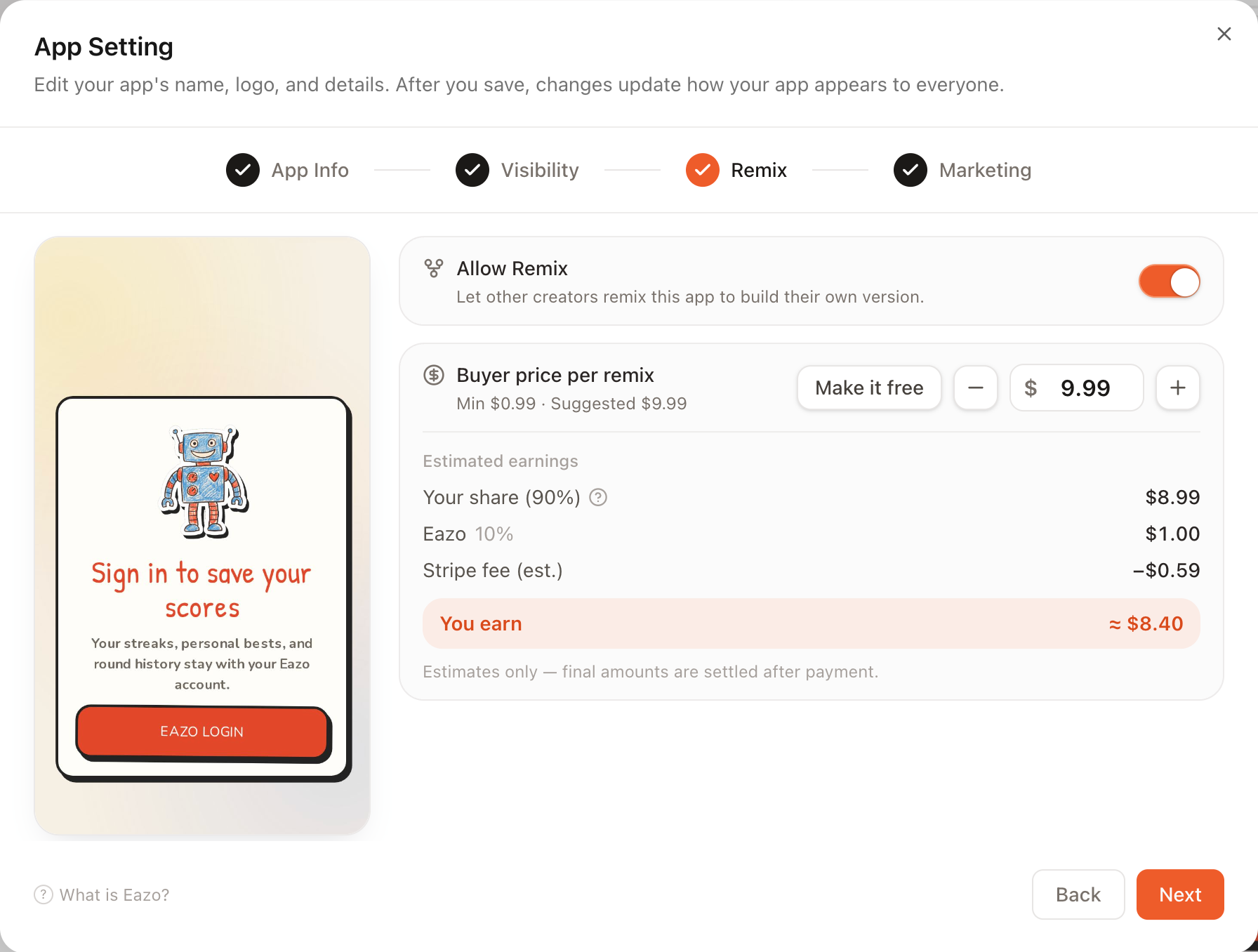
In the Remix step of the Publish / “Launch your app” window:
- Turn on Allow Remix. When it is off, other people do not see a Remix entry point and there is no price;
- Buyer price per remix then appears:
- The default is Free, so anyone can Remix without paying;
- Click Set a price to start with the suggested $9.99 price;
- Use − / + in $1 steps or enter an exact amount. The minimum price is $0.99 per Remix, with no maximum;
- Click Make it free to remove the price.
Paid Remix uses real currency in U.S. dollars and settles through Stripe. It does not use Credits or points. The amount shown is what the buyer pays.
How revenue is divided
After you set a price, the pricing card shows a live revenue split estimate.
These percentages are explanatory and may change. Always follow the split shown on the current pricing card and settlement page.
When someone Remixes your original directly: the original creator receives 80%, and Eazo receives 20%.
When an App has a longer Remix lineage: revenue is shared among creators in the lineage. The first three shares are fixed, while the last share is divided according to lineage length:
- Eazo: fixed 20%;
- Original creator: fixed 30%;
- Direct upstream creator whose work is being Remixed: fixed 30%;
- Other intermediate upstream creators: divide the remaining 20% equally.
When the lineage is too short to have intermediate creators, their 20% goes to the original creator. For a two-level lineage such as “original → upstream → you,” the split is 50% to the original, 30% to the direct upstream creator, and 20% to Eazo.
The diagram uses a → b → c … for the Remix lineage, with a as the original and arrows pointing to each subsequent creator. Parentheses identify who pays for the Remix:
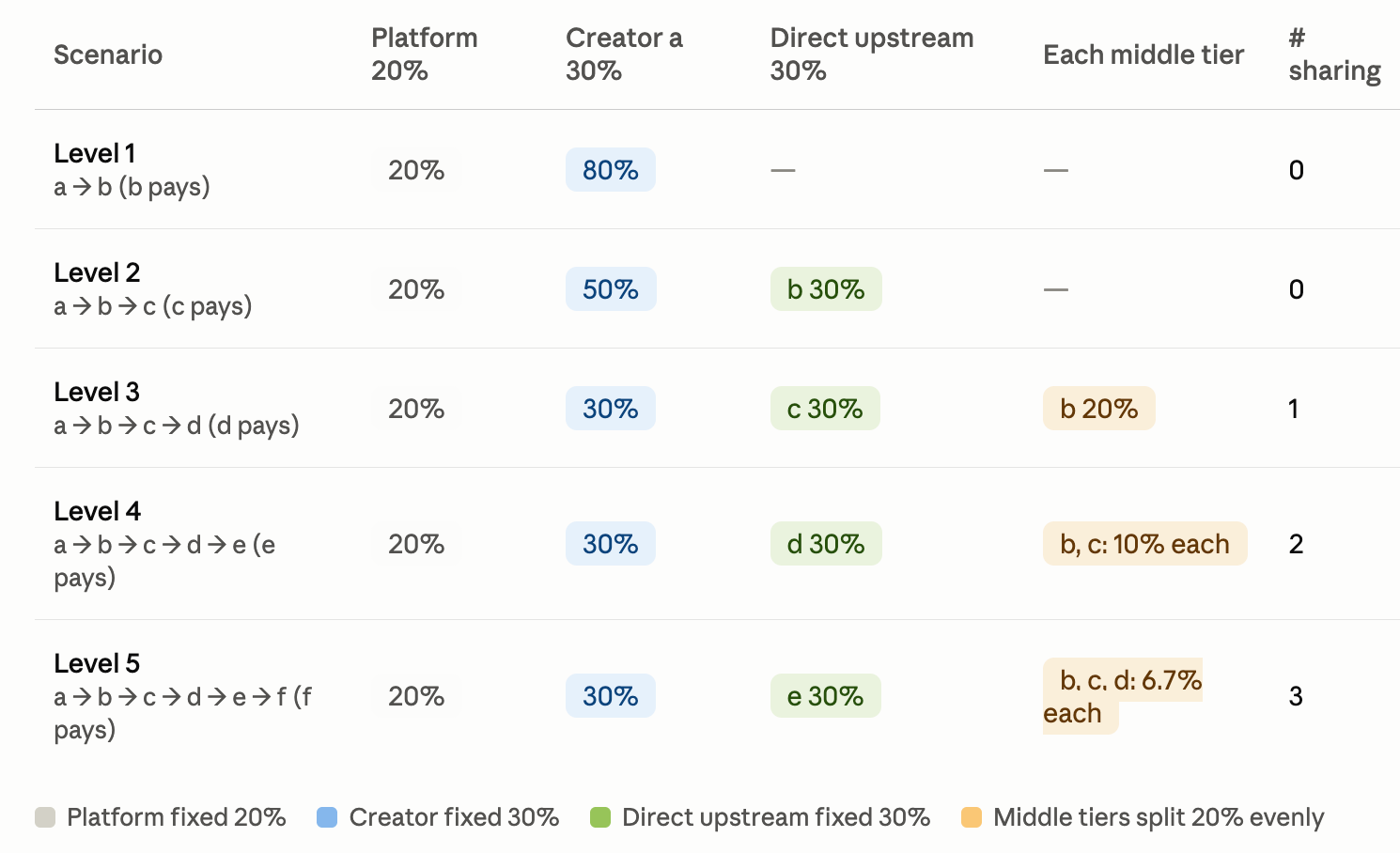
Eazo receives 20%, the original receives 30%, the direct upstream creator receives 30%, and intermediate upstream creators divide the remaining 20%. When no intermediate creator exists, that share goes to the original.
Stripe processing fees are deducted from your seller share, not added to the buyer price. The interface estimates approximately 2.9% + $0.30, while the actual fee is determined by Stripe for the transaction. The take-home amount shown on the pricing card is therefore an estimate, with the final amount determined after payment.
Receive and withdraw Remix revenue
After a successful payment, Remix revenue appears on the Earnings page with the source Paid Remix. It appears alongside revenue from in-App payments and can be filtered by source.
Its settlement period, withdrawal availability, Stripe Express onboarding, and withdrawal process are the same as revenue from the built-in payments capability. See “Revenue settlement” and “Withdrawals” in Add payments to an App. In summary:
- Revenue first appears as pending and usually becomes available after about 30 days;
- Before the first withdrawal, complete Stripe Express onboarding once from Earnings;
- Currently only USD revenue can be withdrawn. Follow the settlement date shown on Earnings.
Additional notes
- After one buyer pays to Remix a particular App, another Remix from the same entry point does not charge that buyer again;
- Turning off Allow Remix immediately removes new Remix entry points without affecting Projects created earlier;
- The Free or paid setting is saved with Publish settings and applies to buyers who enter afterward. Before changing the price, confirm that the published version is the one you want others to reuse.