Configure AI Models for an App
App AI means AI used by visitors inside the App you create. It is separate from talking with the Agent in Eazo Creator.
Eazo includes official model access and usage billing for App visitors. When an App needs AI conversation, generation, analysis, recommendations, or image understanding, the Agent identifies the capability and displays a Configure AI model card after design confirmation and before the full build. With an Eazo official model, you do not need a provider account, API Key, or server integration. Select a model and understand its Credits usage. In an existing App, you can also ask the Agent to change models, add AI capabilities, use your own Key, or disable AI.
The configuration card offers three choices:
- Do not use an AI model: continue with ordinary App functionality;
- Use Eazo AI service: visitors need no API Key, and usage is deducted from the creator's Credits;
- Use my own API key: the creator pays the model provider directly.
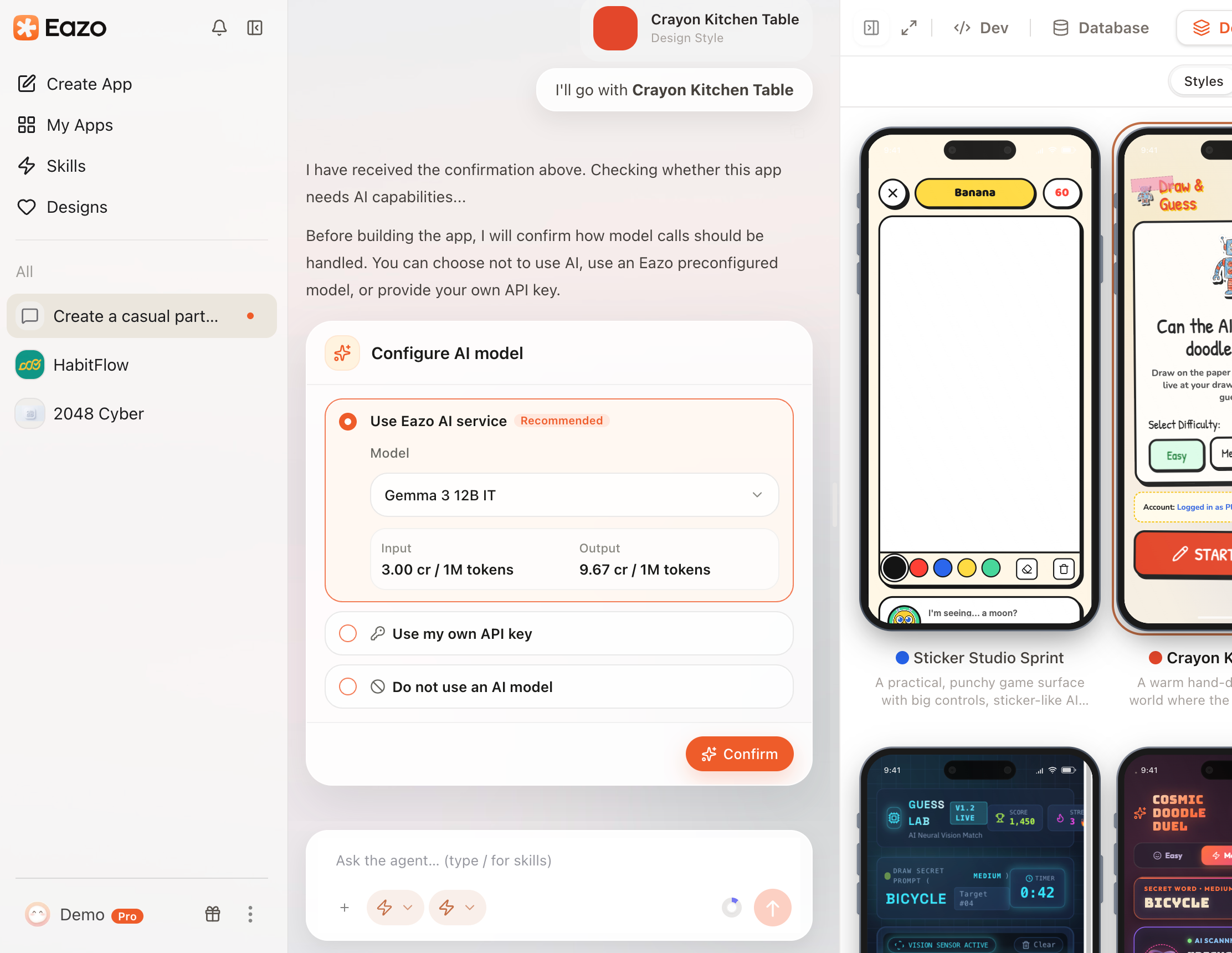
Choose Do not use an AI model, Use Eazo AI service, or Use my own API key.
Available models and capabilities such as text, image understanding, and image generation follow the current configuration card. You can also review Models and built-in AI capabilities supported by Eazo.
Billing for Eazo official models
Charges occur only when the App actually calls a model. Saving a configuration alone does not create usage charges. Text and vision are billed by input and output Tokens. Image generation is billed by actual image tokens, and the rates page shows an approximate cost per image. Video, speech-to-text, and text-to-speech are billed by real upstream cost. Follow Settings > App usage > Model pricing rates for the current rates and billing method.
| Provider |
Model |
Vision |
Input (Credits/1M Tokens) |
Output (Credits/1M Tokens) |
Context length |
| xAI |
Grok 4.3 |
✅ |
41.67 |
83.33 |
1M |
| Google |
Gemma 4 E2B |
✅ |
1.33 |
2.67 |
128K |
| Google |
Gemma 4 31B |
✅ |
4.67 |
13.33 |
256K |
| Google |
Gemma 4 26B-A4B |
✅ |
4.33 |
13.33 |
256K |
| Google |
Gemma 3 4B IT |
✅ |
1.33 |
2.67 |
128K |
| Google |
Gemma 3 12B IT |
✅ |
3.00 |
9.67 |
128K |
| Google |
Gemma 3 27B IT |
✅ |
7.67 |
12.67 |
128K |
| OpenAI |
GPT-5.4 |
✅ |
91.67 |
550.00 |
272K |
| OpenAI |
GPT OSS 20B |
❌ |
2.33 |
10.00 |
128K |
| OpenAI |
GPT OSS 120B |
❌ |
5.00 |
20.00 |
128K |
| OpenAI |
GPT OSS Safeguard 20B |
❌ |
2.33 |
6.67 |
128K |
| OpenAI |
GPT OSS Safeguard 120B |
❌ |
5.00 |
20.00 |
128K |
| Anthropic |
Claude Haiku 4.5 |
✅ |
36.67 |
183.33 |
200K |
| DeepSeek |
DeepSeek V3.2 |
❌ |
20.67 |
61.67 |
164K |
| DeepSeek |
DeepSeek-V3.1 |
❌ |
19.33 |
56.00 |
128K |
| Qwen |
Qwen3 Coder Next |
❌ |
16.67 |
40.00 |
256K |
| Qwen |
Qwen3-Coder-30B-A3B-Instruct |
❌ |
5.00 |
20.00 |
256K |
| Qwen |
Qwen3 Coder 480B A35B Instruct |
❌ |
15.00 |
60.00 |
128K |
| Qwen |
Qwen3 235B A22B 2507 |
❌ |
7.33 |
29.33 |
256K |
| Qwen |
Qwen3 VL 235B A22B |
✅ |
17.67 |
88.67 |
256K |
| Qwen |
Qwen3 Next 80B A3B |
❌ |
4.67 |
40.00 |
256K |
| Qwen |
Qwen3 32B |
❌ |
5.00 |
20.00 |
32K |
| Moonshot AI |
Kimi K2.5 |
✅ |
20.00 |
100.00 |
256K |
| Moonshot AI |
Kimi K2 Thinking |
❌ |
20.00 |
83.33 |
256K |
| MiniMax |
MiniMax M2.5 |
❌ |
10.00 |
40.00 |
196K |
| MiniMax |
MiniMax M2.1 |
❌ |
10.00 |
40.00 |
196K |
| MiniMax |
MiniMax M2 |
❌ |
10.00 |
40.00 |
1M |
| Z.AI |
GLM 5 |
❌ |
33.33 |
106.67 |
200K |
| Z.AI |
GLM 4.7 |
❌ |
20.00 |
73.33 |
203K |
| Z.AI |
GLM 4.7 Flash |
❌ |
2.33 |
13.33 |
203K |
| Mistral AI |
Devstral 2 123B |
❌ |
13.33 |
66.67 |
256K |
| Mistral AI |
Magistral Small 2509 |
✅ |
16.67 |
50.00 |
128K |
| Mistral AI |
Mistral Large 3 |
✅ |
16.67 |
50.00 |
256K |
| Mistral AI |
Ministral 14B 3.0 |
✅ |
6.67 |
6.67 |
128K |
| Mistral AI |
Ministral 3 8B |
✅ |
5.00 |
5.00 |
128K |
| Mistral AI |
Ministral 3B |
✅ |
3.33 |
3.33 |
128K |
| Mistral AI |
Voxtral Small 24B 2507 |
❌ |
3.33 |
10.00 |
32K |
| Mistral AI |
Voxtral Mini 3B 2507 |
❌ |
1.33 |
1.33 |
32K |
| NVIDIA |
Nemotron 3 Super 120B |
❌ |
5.00 |
21.67 |
256K |
| NVIDIA |
Nemotron Nano 3 30B |
❌ |
2.00 |
8.00 |
256K |
| NVIDIA |
Nemotron Nano 12B v2 VL BF16 |
✅ |
6.67 |
20.00 |
128K |
| NVIDIA |
Nemotron Nano 9B v2 |
❌ |
2.00 |
7.67 |
128K |
| Writer |
Palmyra Vision 7B |
✅ |
5.00 |
20.00 |
4K |
Model availability and rates can change. Follow the information shown in the App AI configuration interface.
When Credits run out, Apps that are enabled and use an Eazo official model pause AI usage. After a top-up, Apps that remained enabled resume automatically. An App you disabled manually does not turn itself back on.
Use my own API key
Enter the model provider and Key in the dedicated configuration card. The Key is stored in the generated App's server environment and is never placed in browser code.
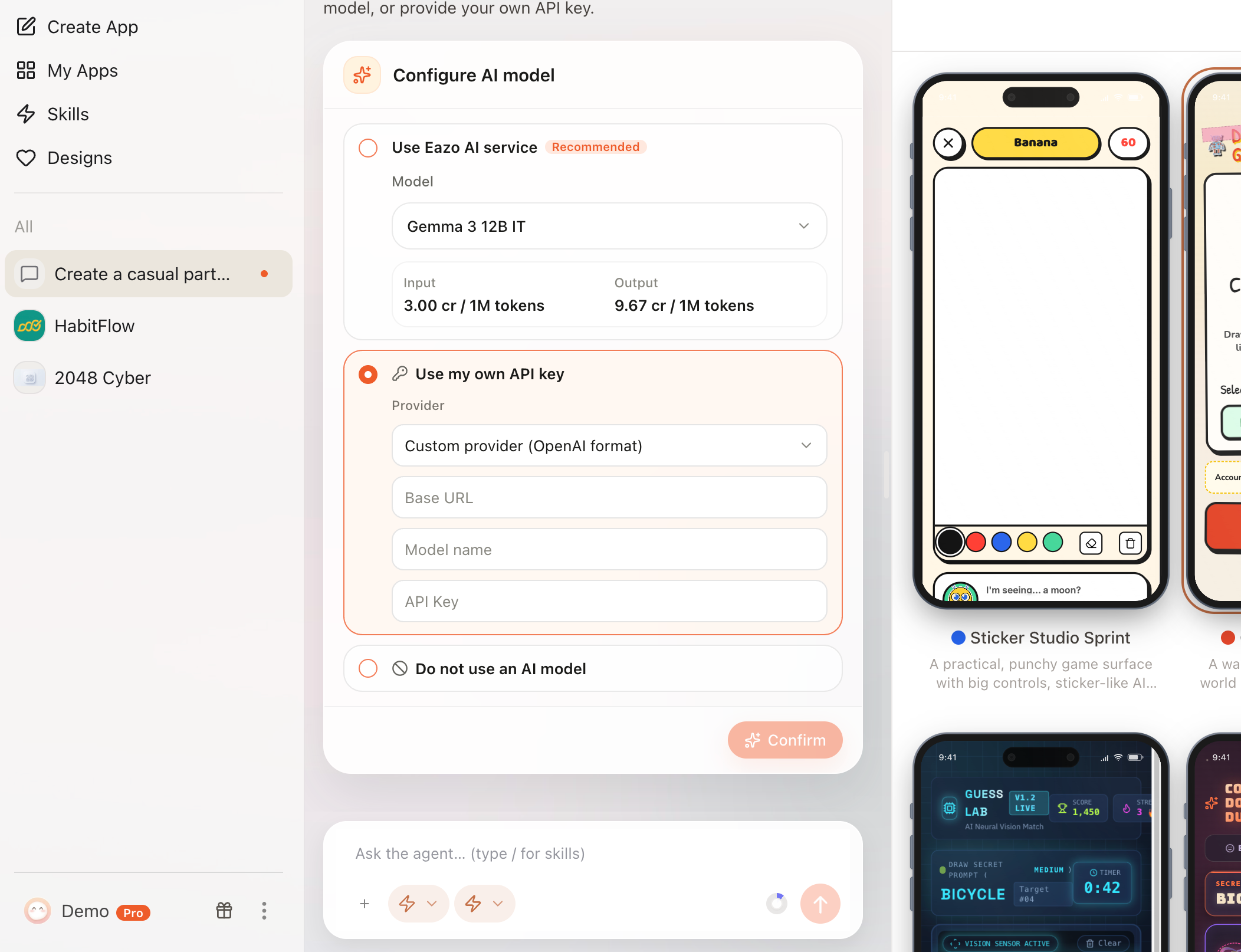
Choose a model provider and enter its Key in the dedicated configuration card.
Do not send a complete Key in a normal Chat message. Calls made with your Key do not consume Eazo Credits for App AI; you manage the provider's charges and quotas.
Review and manage App AI usage
Open More > Settings > App usage to review:
- The current model for each App;
- Total, last-30-day, and last-7-day Credits usage;
- Call count;
- Credits used, plus input and output Tokens for text models;
- Current model rates, including billing for image, video, and speech.
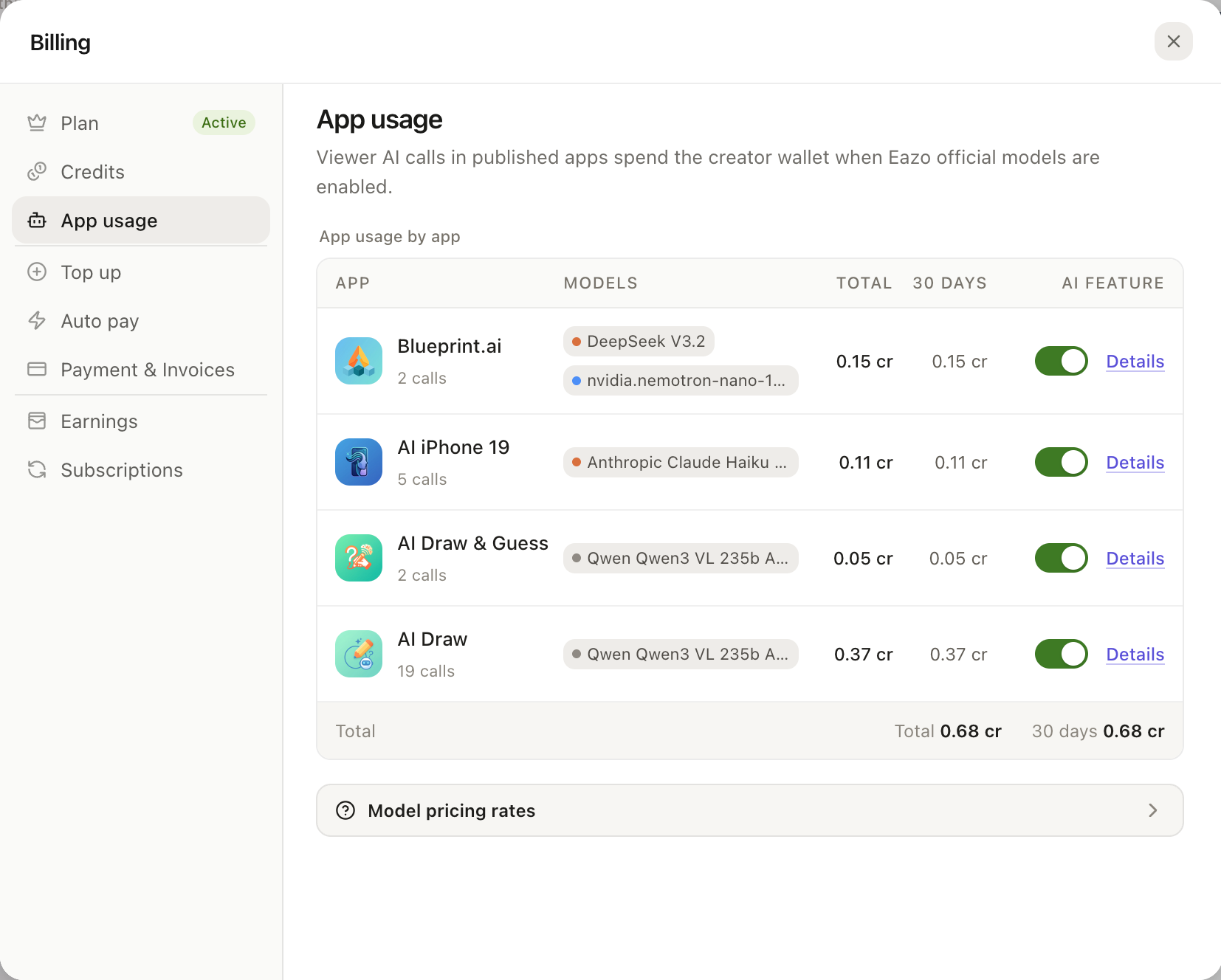
App usage in Settings shows models, consumption, calls, Tokens, and rates for each App.
You can disable Eazo AI for one App. New calls stop immediately while history remains. Re-enable it to let visitors use AI again.
Change an App's AI model
Return to the Project Chat and describe the goal. A model-only change usually updates configuration, while adding a new AI capability may require App changes. Test again and update the published version afterward.