Choose a Creation Mode
Autopilot mode
Best for a clear goal when you want a complete result quickly. The Agent handles more details automatically and asks for confirmation only at key points.
Collaborative mode
Best when you want step-by-step control over scope, design, and implementation decisions. The Agent pauses for confirmation at more points.
Switch between Autopilot and Collaborative in the composer. A mode change mainly affects future work and does not undo anything already completed.
A regular message starts the task from your instructions without automatically entering design-direction exploration.
If you want to compare visual options before the build, say so in your message. For example:
Generate three design directions for this App first. Continue with the build after I choose one.
When you request design directions, you can ask for one to six. If you do not specify a count, the Agent generates six by default.
Model and thinking
Open the model button in the composer to choose a model and a thinking level:
- Fast: writing, styling, and small changes;
- Standard: the balance point for most tasks, including multiple pages, states, or more involved flows;
- Deep: architecture, mathematics, code, and complex logic.
When unsure, keep the current setting. If a complex problem cannot be solved in one pass, increase thinking and restate the task.
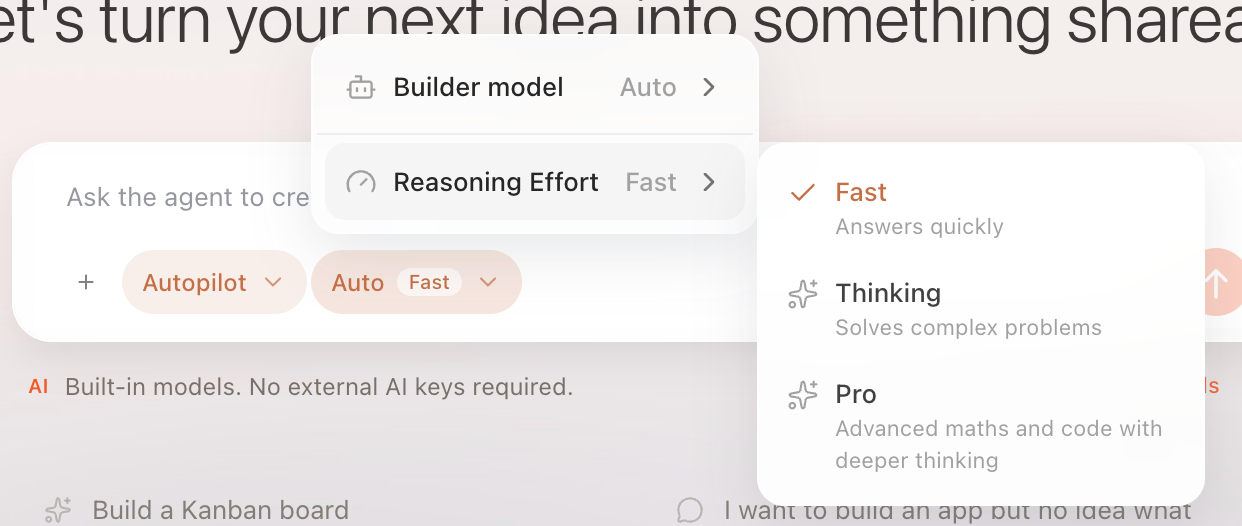
Choose a model in the composer menu, then switch among Fast, Standard, and Deep.