Get to Know the Eazo Workspace
Eazo creates a Project for every App you build. The Project stores the App's design, features, data, preview, and creation history.
A Project can contain multiple Chats. You can use separate Chats for design, features, or troubleshooting, while all of them modify the same App.
Inside a Project, you will mainly see:
- Chat: describe requirements, answer the Agent's questions, confirm plans, and request changes;
- Chat tabs: switch between tasks or create a new Chat in the current Project;
- Preview: test the App in phone or desktop view;
- Design: appears after design options are generated. Review and select visual styles, and inspect generated frontend pages;
- Prototype: appears after prototype pages are generated. Inspect commentable pages on a canvas;
- Files: browse the App file tree, preview images, videos, PDFs, audio, and 3D models, or inspect source files;
- Database: appears after the project has a managed database. Inspect data saved by the App;
- Publish: obtain a production link and manage published versions.
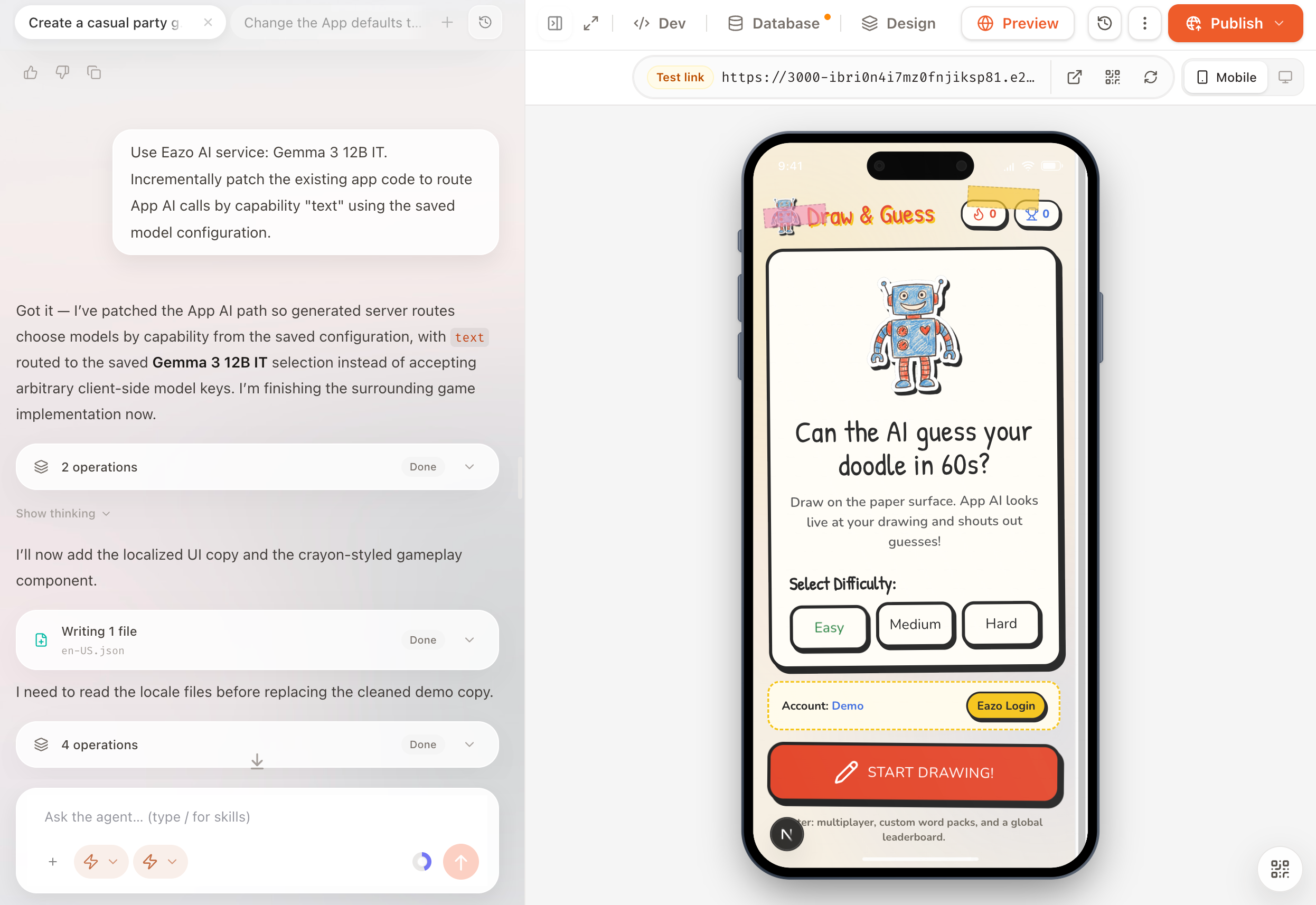
Within a Project, switch among Chat, Preview, Design, Prototype, Files, Database, and Publish.
Use the left sidebar to find, pin, rename, archive, or delete Projects and conversations. My Apps lists Apps that have been successfully published or deployed at least once, where you can continue editing or open the production version. Open an App that has never been deployed from its Project instead.