Add Payments to an App
Eazo includes checkout, payment results, and paid-entitlement capabilities. When an App needs a one-time paid unlock or a monthly subscription, the Agent connects the purchase and entitlement flow. You can also open More skills in the composer and select Integrate Eazo Payments (integrate-eazo-payments) for the current App. You do not need to register with or integrate Stripe or another payment platform, manage payment keys, or build checkout. Confirm the product or entitlement, price, and currency, and complete payout-account setup only when you want to withdraw earnings.
Eazo currently supports:
- One-time purchases or unlocks;
- Monthly subscriptions, including cancellation and resumption.
Before adding payments, specify the product or entitlement name, price, and currency. The price must meet the range shown in the interface; the Agent does not silently change an invalid price. A customer must sign in before payment, and the result and paid entitlement are tied to that user.
Customers enter checkout through Eazo's Stripe payment connector and return to the App after completing or canceling payment.
Payments and withdrawals are separate
An App can begin accepting payments without a payout account. Only when you are ready to withdraw earnings to a bank account do you need to complete Stripe Express onboarding under More > Settings > Earnings. Eazo's shared Stripe payment connector accepts customer payments, while your Stripe Express account receives withdrawals.
Revenue settlement
After a successful payment, earnings are not immediately withdrawable. They first appear under Pending settlement and usually move to Withdrawable balance after about 30 days. This settlement period begins when payment completes and covers refund and dispute risk, the arrival of Stripe funds, reconciliation of actual processing fees, and required risk reviews.
Revenue moves to Withdrawable balance automatically at the end of the period. Refunds, disputes, failed payments, and expired payments do not enter the withdrawable balance. Refunded or disputed records may remain in Earnings records for reconciliation. Follow the settlement date shown on Earnings; when rules change, new earnings use the new rules.
What appears on Earnings
Three totals appear at the top:
- Pending settlement: net earnings from successful payments still within the settlement period;
- Withdrawable balance: settled net earnings that can be withdrawn now;
- Total withdrawn: the total amount from historical withdrawals, alongside the latest withdrawal.
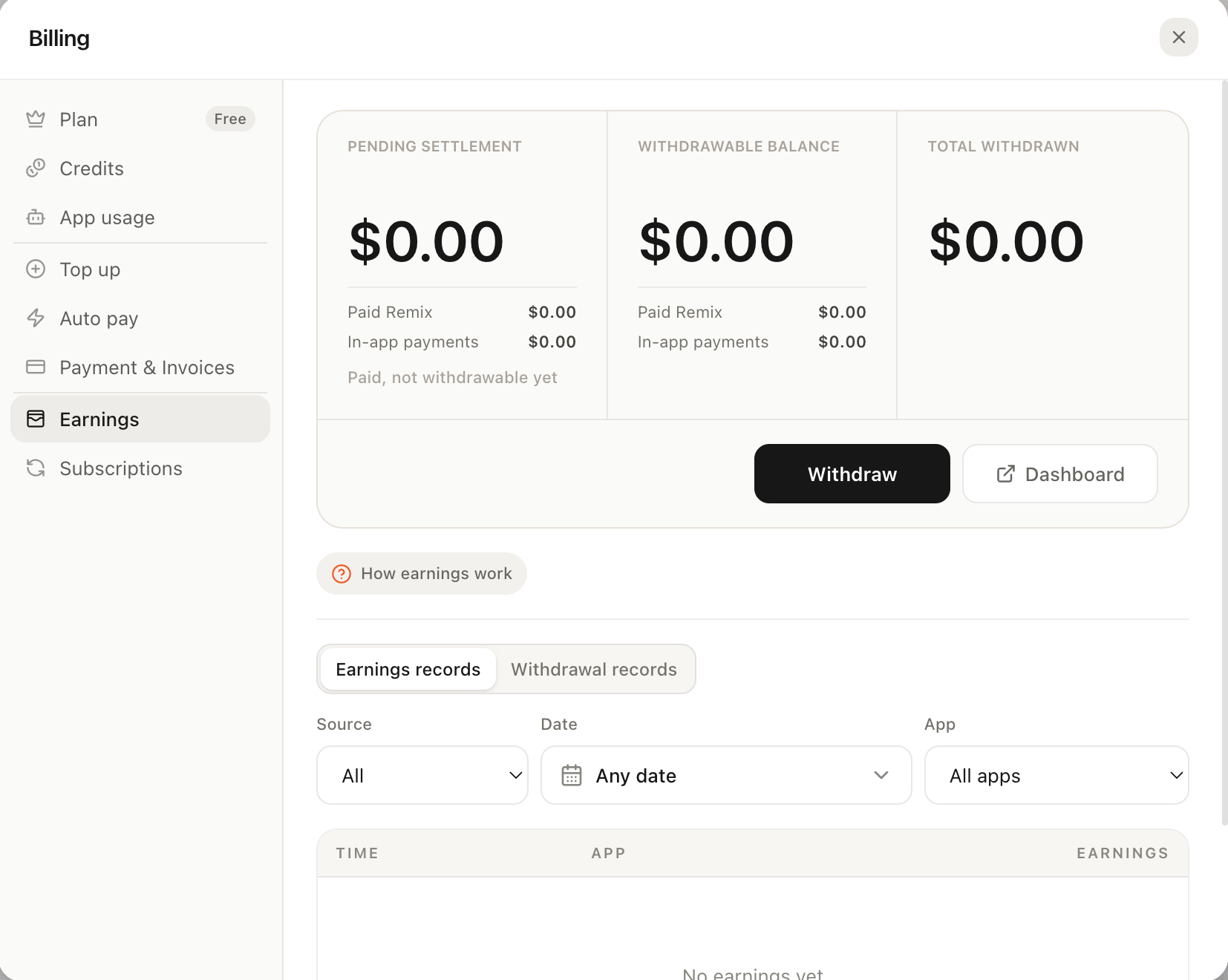
Earnings shows Pending settlement, Withdrawable balance, and Total withdrawn above Earnings records.
Under Earnings records, you can filter individual earnings by source, date, and App. Filters affect only the list, not the totals, and dates use your browser's time zone. Sources include in-App payments and Paid Remix; for Remix setup, see Allow Remix and set a price. Each record shows time, App, product, status, customer total, Eazo platform fee, actual Stripe processing fee, and your net earnings. Withdrawal records lists each batch amount, included payment count, estimated arrival date, and Payout ID.
Your net earnings = customer total − Eazo platform fee − actual Stripe processing fee. Eazo currently charges no platform fee, so net earnings are generally the customer total minus the actual Stripe processing fee. Eazo may introduce a platform fee later; its rate and amount will appear on Earnings. The displayed “approximately 2.9%–5.4% + US$0.30” is only a reference for common U.S. card payments. Follow the actual Stripe fee, refund, dispute, and platform-fee records shown on Earnings.
Withdrawals
- Before your first withdrawal, complete Stripe Express onboarding from Earnings with identity and bank information. If Stripe requires more information, the page guides you through it.
- When a balance is available, click Withdraw. Eazo claims eligible earnings from oldest to newest, sends them to your Stripe Express account, and Stripe pays your bank.
- After the withdrawal request, the page confirms that funds were sent to Stripe Express. Track the transfer and bank payout in the Express Dashboard.
An Eazo withdrawal request does not mean the bank has received the money. Final arrival depends on Stripe's payout state—processing, in transit, paid, or failed—and the receiving bank. Eazo cannot promise a specific arrival time on Stripe's behalf. Currently, only USD earnings can be withdrawn; balances in other currencies are not selected.
A failed withdrawal can be retried safely. The system resumes an incomplete batch first and does not pay it twice, but check the Dashboard for causes such as incorrect bank information. Daily and cumulative withdrawal limits currently protect against risk. At the daily limit, the page asks you to try again tomorrow. Contact support if withdrawals remain unavailable for another reason. These limits may change and are not a permanent policy.