Share an Entire App
Platforms: iOS and Android
Last updated: August 11, 2026
Before using an App
Apps are built by different creators, so features and data handling can vary.
- An App may request camera, photo library, microphone, location, or notification access.
- An App may connect to third-party services.
- Before submitting personal information, uploading files, or paying, confirm the page source and purpose.
- Do not enter passwords, verification codes, complete payment-card details, or API keys in an App you do not trust.
Share an App
- Open the App.
- Open the App’s More menu.
- Tap Share.
- Choose Community, Messages, or the system share sheet.
- Check the recipient and accompanying text before sending.
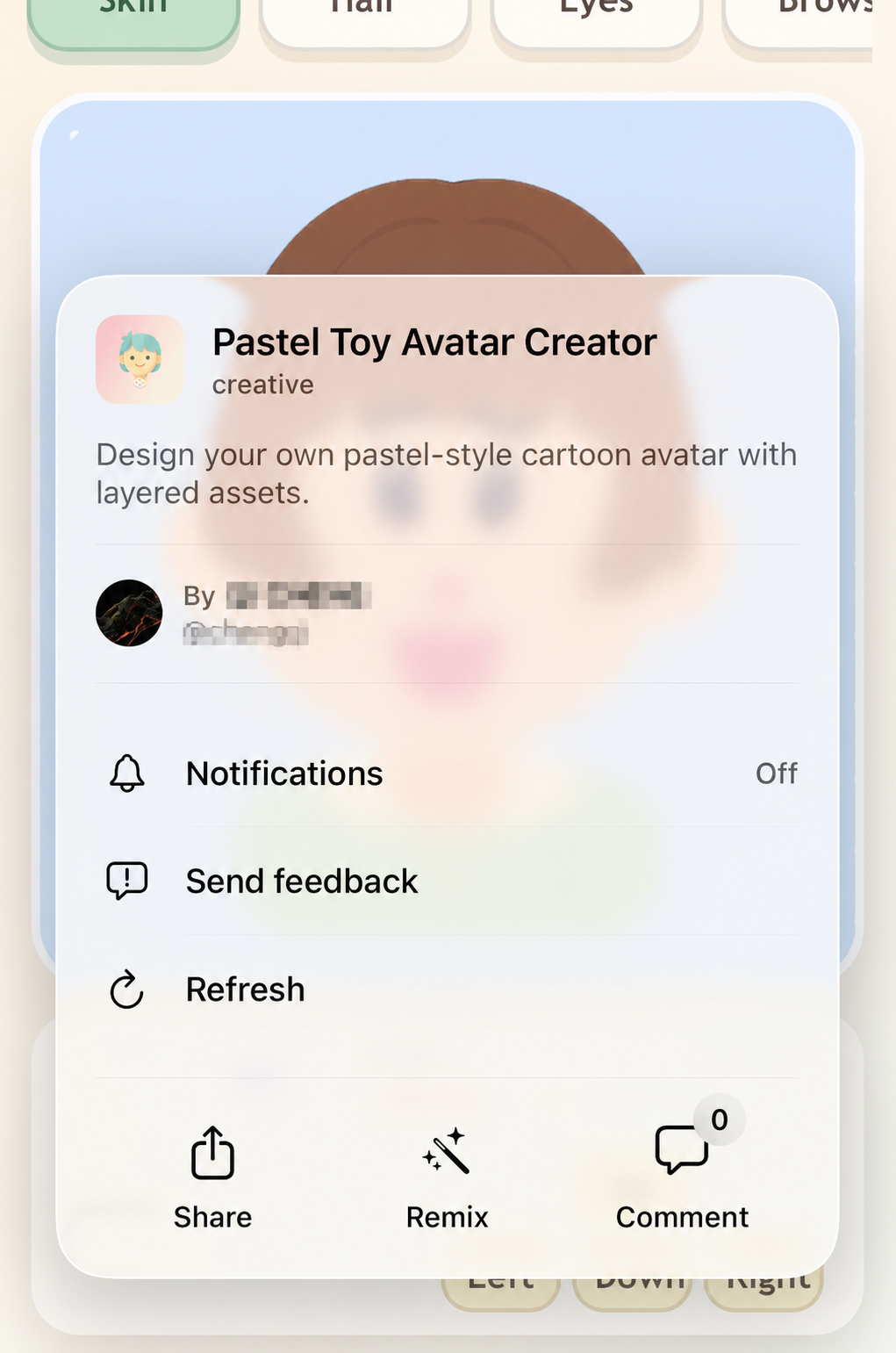
Figure 1: Choose Share from the App’s More menu.
Sharing an App does not automatically copy personal records you entered into it. Specific data behavior still depends on how that App was built.
If the recipient cannot open the link
- Confirm that the link is complete.
- Confirm that the App is still public and available.
- Ask the recipient to sign in to the correct account.
- Make sure their Eazo version supports the content.
- Check that the current network can reach Eazo.
If it still fails, contact Support with the complete link and time of the issue.