Publish and host your App with Eazo
Publish the App you built in Eazo to a production link and QR code. Share it with users, release updates, and manage earlier versions from the same Project.
Create and publish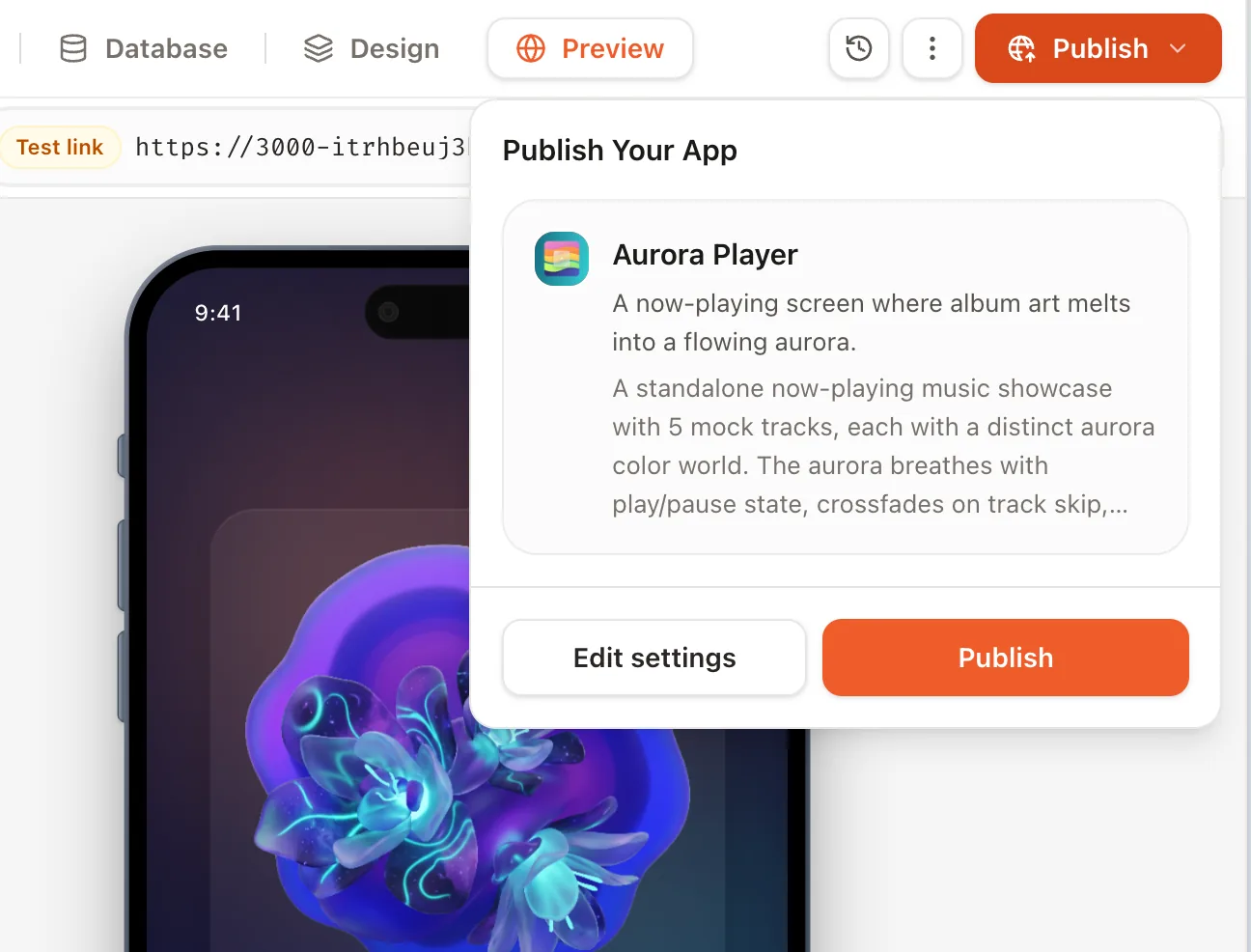
Host and deploy your App from Eazo.
Your Project carries the App from build to release. Eazo handles deployment, so the work of putting the App online stays where you created it.

Move straight from build to launch
Test the App in Preview, then publish from the Project. There is no separate hosting service or deployment pipeline to set up.
Share a live App with users
Give visitors an ongoing production experience while you continue working on the next version in Preview.
Control when updates go live
Continue improving the App in the same Project and decide when a tested update goes live.
What you get when you publish an App.
Publishing creates a live version of your App with the essentials for presentation, sharing, and release management.
 Scan to open the live app on your phone
Hosted production version
Eazo deploys the current App as a separate version for visitors to open while you keep working in Preview.
Production link and QR code
Copy the App URL or share its QR code so people can open the same published experience across devices.
App name, logo, description, and cover
Present the App with a name, logo, short description, full introduction, and optional cover.
Deployment and release history
See previous deployments and their timestamps, open an earlier version, or make one live again.
App hosting for creators and teams.
Eazo hosting suits creators and teams that need a live App without maintaining a separate deployment setup.
Creators publishing a first App
Put a finished prototype, game, or interactive idea in front of real users without learning server deployment first.
Lean teams sharing a working tool
Give customers, members, or colleagues a production link to an App built for their workflow.
Teams improving an active App
Ship changes on your schedule and keep earlier deployments available when you need to inspect or restore one.
Choose how your App reaches people.
A published link can be shared directly. Your visibility choice determines whether the App can also be discovered in the Eazo Community.
Can appear in Eazo Community after approval.
Stays out of listings. Anyone with the link can open it.
Public discovery
After approval, a public App can appear in the Eazo Community. Updates or cover changes may require another review.
Direct link sharing
A private App stays out of Community listings, but anyone with its link can open it. Use App sign-in and access rules for restricted content.
Remix permission
Choose whether other creators may Remix your published App.
Update your live App and manage past releases.
Continue editing in Preview, then publish each tested change when it is ready. The production address usually stays the same across updates.
Release updates deliberately
Preview changes stay in the workspace until you select Update in Publish.
Review earlier versions
Open Deployments to inspect past releases without changing the version visitors currently see.
Return to a prior release
Make a previous deployment live again, or load its code into the sandbox to continue editing. Loading old code replaces the current workspace.
Frequently asked questions about App hosting and deployment.
Clear answers about setup, control, limits, and what happens after you begin.
Why publish with Eazo instead of sharing Preview?
Preview runs in the build workspace and its sandbox address may expire. Publishing deploys the App for ongoing use and gives you a production link and QR code to share.
Who is Eazo App hosting for?
Eazo hosting suits first-time App creators, lean teams without dedicated hosting infrastructure, and teams that regularly update a live App. Publishing from the Project provides a production link and a way to manage later releases.
Will the App’s URL change when I publish an update?
The production address usually stays the same. Test the new version in Preview, then submit an Update; Preview changes do not go live automatically.
What can I configure before publishing?
Add a logo, name, short description, full introduction, and optional cover. Choose public or private visibility and whether other creators may Remix the App, then review the preview before submitting.
Who can open a private App?
A private App is excluded from Community discovery, but anyone who has its link can still open it. Do not treat that setting as account-level access control; use authentication and data permissions when the App contains restricted experiences.
Does a public App automatically appear in the Eazo Community?
No. A public App becomes eligible for Community discovery after review. You can still share its production link directly while its Community visibility is being determined.
Can I roll back if an update goes wrong?
Yes. Deployment history lets you inspect an earlier release, load earlier code back into the sandbox, or set a previous deployment as the production version.
What happens if publishing fails?
Review the reported issue, correct it in the Project, and test the affected flow in Preview before publishing again. Check the production App after the next successful release.
How much does it cost to host a published App?
Hosting and usage allowances depend on the current plan and the capabilities your App uses. Check Pricing for the latest plan limits before launching a high-traffic or resource-intensive experience.
Take your App from preview to people.
Build, test, and publish from one place. Share the link when you’re ready.