
Eazo 1.7 brings collaboration to the web creator, a reworked mobile home, and a new credit policy. Here’s how it works, walked through with a real project.
Making an app rarely fits inside one head. Someone has the idea. Someone else has strong opinions about the visuals. A third person cares about how it feels to tap through. Until now, bringing a collaborator into an Eazo project meant the usual workaround: screenshots in a chat thread, progress retold in words, and feedback carried back by hand into the creation flow.
Eazo 1.7 changes that. On the web, Eazo Creator now lets you invite people straight into a project’s working context: the same brief, the same conversation, the same generated results. Below is a walkthrough of what that looks like in practice, using the project we recorded for this release: a music player page with an aurora flowing around the album art.
1. Invite and join
The project owner starts the way any Eazo project starts, by describing the goal: a music playback screen where an aurora effect drifts around the cover art, with several visual styles to compare. Once Eazo begins generating design directions, the owner opens Invite to collaborate on the page.
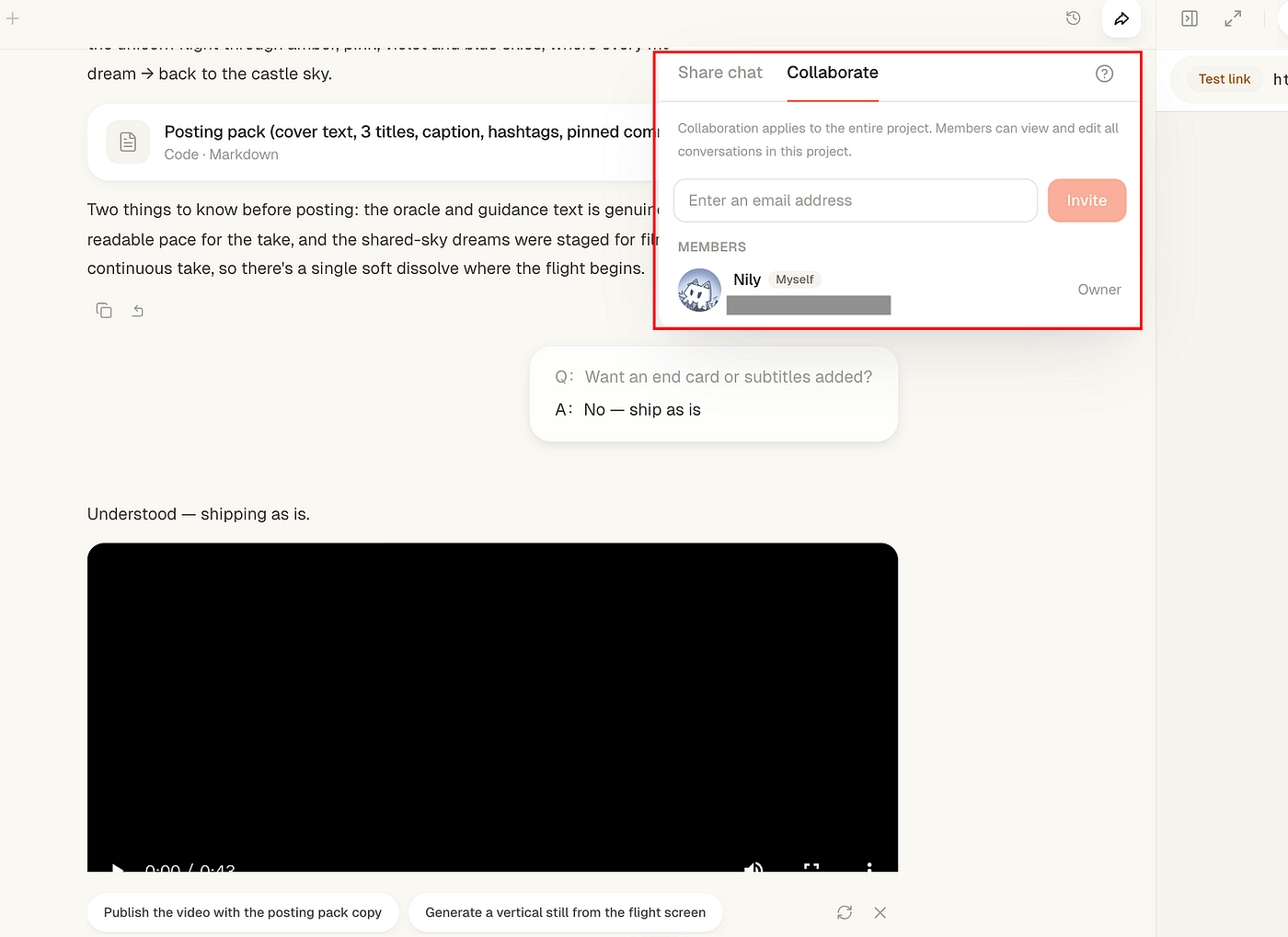
In the recording, the collaborator opens the project link and taps Request to collaborate. The request shows up in the owner’s invite panel right away. The owner approves it, the collaborator enters the project, and the full conversation so far becomes visible to them.
The path, in short: the owner opens the invite panel, the collaborator opens the link and requests access, the owner approves, and the collaborator is in.

2. Deciding together
Sharing a page is easy. Sharing a decision is the point.
Once inside, the collaborator sees the original brief and the questions Eazo asked along the way. They choose Generate six visual designs. The owner sees that choice land in real time, and the generated results appear in the same project for both of them.
When the six directions come back, the collaborator picks one first: a version where the cover art and the light trails face each other. The owner builds on that result instead of restarting: “I’ll go with the second one. Use that, and build the app for me.” Then come the refinements: font size, contrast, whitespace.
This is the pattern collaboration is designed for. One person explores the options. The other narrows them down and iterates. Each step continues from what already exists, so nobody has to re-explain the whole project.
3. Members and permissions
Who can join should be as clear as what they can do.
The owner can return to the invite panel at any time to see current members, send invitations by email, or handle new access requests. In our example, the panel lists both the project owner and the collaborator who joined.
When the collaboration is over, the owner selects Remove next to a member. In the recording, the removed collaborator reopens the project and sees the “Request to join” prompt again, which is exactly what you would expect.
4. Who pays the credits?
A natural question when two people share a project: whose credits are being spent?
The answer is simple. Credits consumed during a collaboration are charged to the session owner and are never deducted from a collaborator’s account. So before inviting anyone, the owner can divide up the work and also know up front where the cost will land.
The credit policy itself was updated in this release:
- New accounts receive 400 credits on sign-up, valid for one year.
- After that, visiting Eazo on web or mobile each week grants 50 credits for continued exploration and iteration. Weekly credits are valid for 30 days.
- Each account receives the weekly grant once per week. Switching devices does not trigger it again.
5. A refreshed mobile home
Eazo 1.7 also reworks the mobile Home page, merging community content and apps into a single browsing entry point.
From Home, you can discover image-and-text posts, videos, text cards, and creator-built works. The same unified “create” entry lets you either start building an app or publish a post. When publishing a post, you can link it to an app, a Skill, or a group, and plain text can be turned into a text card.
Alongside that, in-app sharing and post sharing have been smoothed out, and there is a new creation entry that generates a 3D scene from a photo. The bottom navigation and the notification entry have been rearranged, with notifications now collected on the Message page.
The thread running through the mobile update is continuity: discover something, make something, share it, without leaving the flow.
Collaboration is live now in Eazo Creator on the web. Open a project, look for Invite to collaborate, and bring someone in. You can find it at eazo.ai/creator.