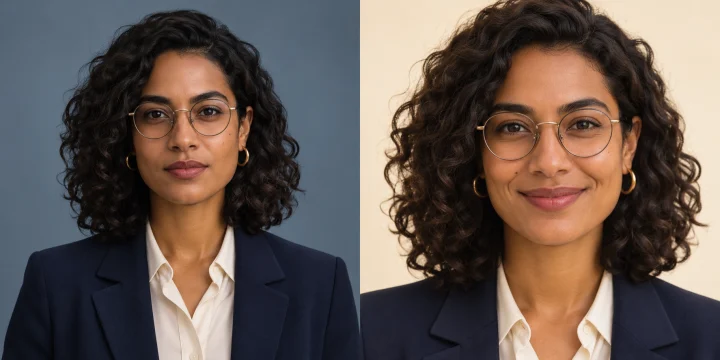
Professional profile photos
Create a headshot direction for a portfolio, LinkedIn profile, or speaker bio with a clear face and uncluttered background.
Start with a photo or a description, then refine the avatar for the profile where you’ll use it.
I need a profile photo for my design portfolio. Use my portrait as a reference and give me a clean studio look. I’ll choose a favorite, then we can adjust the background and crop for my profile.
01 / CHOOSE YOUR DIRECTION
Create a headshot direction for a portfolio, LinkedIn profile, or speaker bio with a clear face and uncluttered background.
Try illustrated or photo-style profile pictures with a strong crop that reads at thumbnail size.
Describe an original character with a distinct silhouette and palette for a gaming or community profile.
Use the same lighting, framing, and background direction for portraits you have permission to work with.
02 / HOW YOUR AGENT WORKS
Say where the avatar will appear and what it should feel like. Use feedback on the first options to narrow your direction.
Design for a portfolio, social profile, gaming account, or team page.
Include the features or style you want to carry through.
Explore a small set of looks with different crops, lighting, or backgrounds.
Choose the option that feels closest to your purpose.
Call out what to keep and what to adjust, such as expression or framing.
Preview the result at thumbnail size and in the shape your profile uses.
03 / THE LONG GAME
You might like the face and clothing in the first studio portrait but want a warmer background and a tighter crop. Bring that version back and point to the details you want carried into the next draft, such as your glasses, curls, and outfit.
Use the options side by side to see what changed. The same reference and style choices can guide another version for a profile that uses a different crop.
04 / GOOD TO KNOW
Eazo is a new kind of personal agent: a relational agent built around an ongoing relationship with you. It works with the goals, people and context you choose to share, helping you start a task and keep moving as your needs change. You guide what it works on and decide which suggestions to act on.
A description is enough for an original character or imagined portrait. For a profile picture based on your appearance, start with a clear photo you own or have permission to use.
An avatar generator gives you a first set of images. With Eazo, you can bring a favorite back, name the features you want to preserve, and refine the background or crop for a specific profile.
Yes. Describe a style that fits the profile, such as a studio headshot, a soft illustration, or a stylized game character. Include a reference when you want a specific direction.
Start with a clear silhouette, a simple background, and enough space around the face for cropping. Check the favorite at the size and shape your profile uses.
Yes. Share the version you want to revise and give specific feedback about the background, expression, or framing. Review the revision next to the earlier version.
YOUR NEXT MOVE
Bring a photo or a short brief and build from the version you like best.
Create my avatar