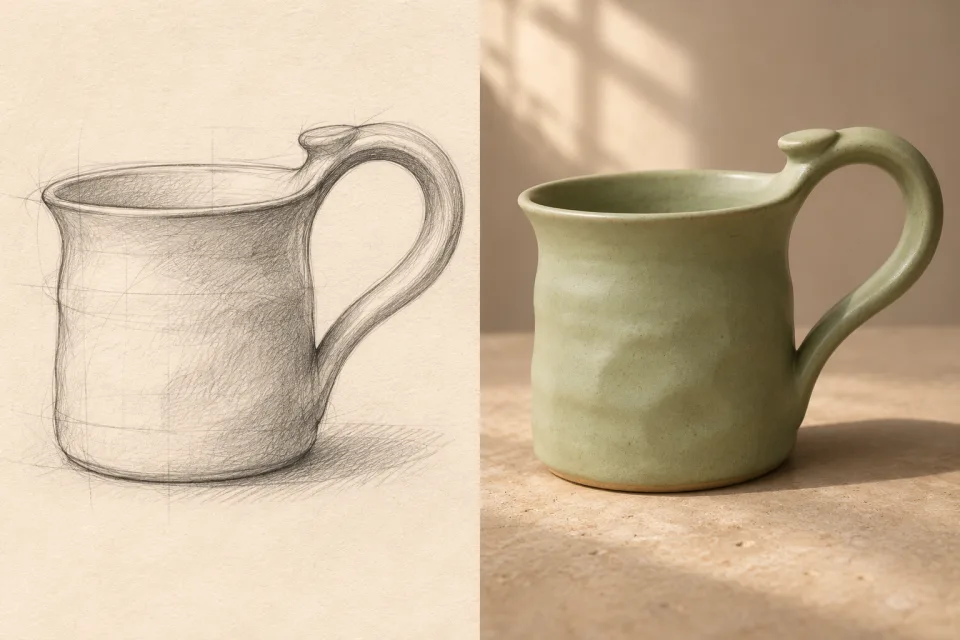
Product sketch to photo
See a hand-drawn object as a realistic product image with its intended shape and finish.
I sketched a ceramic mug with a wide handle that curves up from the rim. Turn it into a realistic product photo in matte sage-green clay with soft window light. Keep the mug shape and unusual handle from my drawing. If the first result changes those details, I want to adjust it together.
01 / CHOOSE YOUR DIRECTION
Different drawings need different materials, lighting and details to feel real.
See a hand-drawn object as a realistic product image with its intended shape and finish.
Turn a room layout into a believable space with furniture, materials and daylight.
Explore how a facade or building concept could look with real surfaces and surroundings.
Visualize a garment design with fabric texture, fit and styling on a person.
Bring a drawn face or figure into a photographic style while preserving key features.
Develop a loose pencil drawing into a convincing scene without losing its central idea.
02 / HOW YOUR AGENT WORKS
Your sketch provides the structure. Direction on materials, light and setting gives the first image a purpose.
Share a paper sketch, line drawing or digital draft of the idea.
Point out the silhouette, proportions, pose or layout that define the design.
Describe materials, color, lighting, background and the intended use of the image.
Create a photographic rendering that uses the sketch as its starting point.
Check the result against the original lines and identify what feels different.
Adjust a specific shape, surface or scene detail while carrying the original intent forward.
03 / THE LONG GAME
The first product photo may get the ceramic finish right but straighten the mug’s distinctive curved handle. Bring the generated image back beside your sketch and point to the line that matters.
Your agent can use the original drawing and that feedback to restore the handle while keeping the lighting and material you liked. Continue refining the same design instead of explaining it from scratch again.
04 / GOOD TO KNOW
Eazo is a new kind of personal agent: a relational agent built around an ongoing relationship with you. It works with the goals, people and context you choose to share, helping you start a task and keep moving as your needs change. You guide what it works on and decide which suggestions to act on.
A one-step converter can make a realistic image from a drawing. Eazo can keep working from your original sketch and each result: you can point out a changed line, refine the material or setting, and build a better next version around your design.
Try a pencil drawing, line art, a digital sketch or a clear photo of a paper drawing. Tell your agent what the drawing represents and which parts matter most.
Yes. A rough drawing can be enough to begin. Add a short description of the subject, real-world materials and setting to guide the first result.
Yes. Describe the shapes, placement and proportions you want preserved, then compare the output with the sketch and refine any part that changed.
Yes. Use the sketch to establish the design, then describe the materials, lighting and context that make the result useful for your project.
Yes. Point to the detail in the sketch or generated image and explain what to keep and what to change for the next version.
YOUR NEXT MOVE
Bring your drawing and the details you care about. Create a realistic image, then keep shaping it until it feels like your idea.
Turn your sketch into a photo